



If you are running a WordPress website, youhave likely heard that speed matters. Fast sites make visitors happy, help improve your SEO rankings, and generally give a more professional impression.
But getting your site to load fast can feel overwhelming, especially when you are not a developer.
That is where Autoptimize comes in. It is one of the most popular optimization plugins for WordPress, trusted by over 900,000 websites and regularly updated with new features.
In this guide, we break down what Autoptimize is, how it works, why it is so valuable, and how the Pro version can take your optimization to the next level.
What Is Autoptimize?

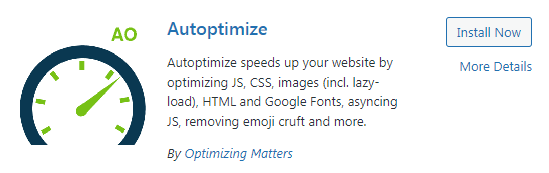
Autoptimize is a free performance optimization plugin for WordPress. It helps your site load faster by cleaning up and optimizing the code that runs in the background.
Most WordPress themes and plugins add JavaScript, CSS, and HTML that might not be as efficient as they could be. Autoptimize tackles this with smart techniques like:
- Minifying code: Removes unnecessary characters like spaces and comments.
- Aggregating files: Combines multiple small files into fewer big ones.
- Caching optimized output: Stores the cleaned-up version so visitors get it instantly.
- Optimizing styles and scripts: So they don’t block the page load.
Autoptimize helps your site send cleaner, leaner files to the browser, which usually means faster load times.
Why Optimization Matters
Visitors expect pages to load in moments, not seconds. If a page takes too long, people abandon it.
Search engines like Google also reward faster sites in search rankings. Even small code inefficiencies can slow things down significantly.
This plugin helps tackle code issues, which makes the user experience better and performance scores higher.
Key Features of the Plugin

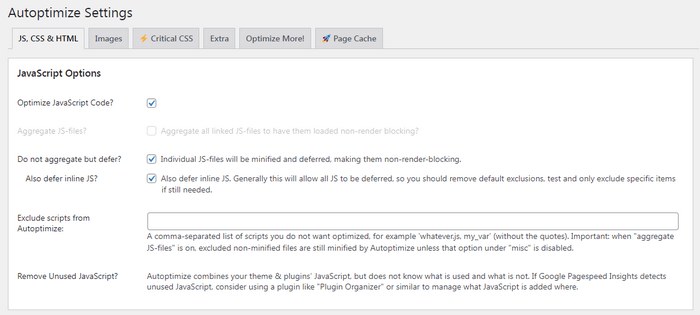
Here is what is included in the free version of Autoptimize:
Minify and Combine CSS, JavaScript, and HTML: Minify the CSS, JS, and HTML to shrink file sizes. Combine multiple files into fewer ones to reduce server requests. Defer or move scripts so they load in the most efficient order.
Caching for Optimized Files: Once the plugin cleans up your files, it caches them so the optimized versions are reused. This means your server doesn’t have to redo the work on every visit.
Image Optimization (Free and Pro): The free version lets you set up lazy loading, which delays loading images until a visitor scrolls to them, cutting down initial page load time. Autoptimize Pro adds deeper image compression and CDN delivery.
Google Fonts Optimization: Google Fonts are used on many sites, but loading them inefficiently can slow things down. Autoptimize can optimize how fonts are loaded to improve speed.
How the Plugin Works
Here is a metaphor: imagine your WordPress site as a kitchen. Every ingredient (CSS, JavaScript, HTML) is on the counter in its original wrapper.
Autoptimize is like a kitchen assistant who:
- Unwraps all the ingredients (minifies code).
- Combines them into better batches (aggregates files).
- Organizes them so they’re easier to use (caches & defers loading)
The result? Faster cooking (page loading) with less confusion and fewer delays.
Potential Conflicts and Testing
This plugin interacts with your site’s code, so it is important to test changes carefully. Too much optimization can sometimes break the layout or functionality until you adjust the settings.
That is why many experts recommend testing one feature at a time and refreshing your site to make sure everything still works. If a specific script or style looks odd afterward, you can exclude it from optimization.
Autoptimize Pro: What’s Added

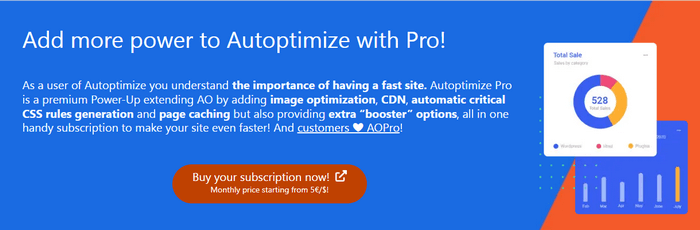
While the free version is powerful on its own, Autoptimize Pro is the premium extension that gives you more advanced performance tools. Some of the big benefits include:
Built-In Page Caching: Autoptimize Pro includes its own page caching system, which can reduce the need for another caching plugin.
Advanced Image Optimization: Automatic compression, next-gen format (WebP, AVIF) support, and more powerful lazy loading help images load faster and smoother.
CDN Integration: With support built in, optimized files can be delivered from edge servers closer to your visitors, reducing load times globally.
Automatic Critical CSS: This helps load only the CSS needed for the first part of the page that a user sees, a key factor for Core Web Vitals performance. These features make Pro a strong choice for business sites, high-traffic blogs, and professional portfolios.
Benefits of Everyday Use
Here is what many site owners experience with Autoptimize:
- Cleaner, faster loading pages.
- Improved SEO performance metrics.
- Higher scores in speed testing tools.
- Smaller file sizes and fewer server loads.
It is a practical, easy-to-use plugin that helps your site perform better without needing to become a coding expert.
Final Thoughts
This tool is effective for most WordPress sites. It does not solve all speed issues alone, but it systematically improves the way your site delivers key resources.
If your goal is to boost performance, enhance user experience, and make your site feel faster, Autoptimize is a plugin worth trying.
Start with the free version, explore settings, measure your performance gains, and consider Autoptimize Pro when you’re ready to unlock advanced optimization features.
You don’t need to be a tech wizard, just thoughtful with your settings and patient in testing changes.


WPBN is curated news aggregator website focusing on trending and hot news from the WordPress community.